Portal 2 Review: How Valve Topped the Unbeatable
Valve took the tightest puzzle design in the industry, doubled the toolset, added a co-op campaign and two of gaming's best-written characters, and somehow made the sequel better than the original.
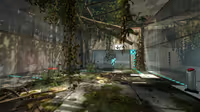
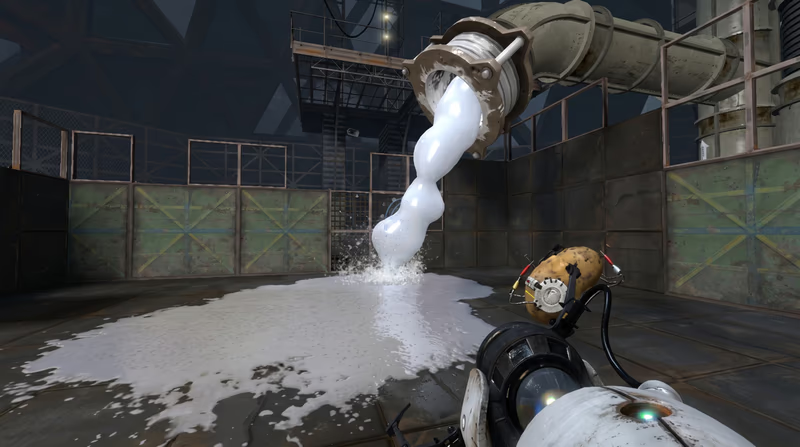
Portal 2, Valve Corporation, 2011

Portal 2 hands you the Aperture Science Handheld Portal Device almost immediately, and the whole game rides on a control scheme simple enough to learn in one chamber: left trigger or click fires a blue entry portal, right fires an orange exit portal, both only land on specific pale, flat surfaces the game marks as portal-able. Everything else, dark paneling, metal grating, glass, won't accept a portal no matter how precisely you aim.
Before anything else clicks, get comfortable firing portals at a moving target, your own reticle, without overthinking the geometry. The early chambers are built to teach muscle memory, not puzzle-solving, so don't rush past them looking for a challenge that isn't there yet.
Every chamber in Aperture's testing track telegraphs its own solution if you know what to look for. Portal-able surfaces are always the same pale off-white material, panels that slide or rotate are usually triggered by a button or a cube, and anything glowing or color-coded, gel, laser fields, light bridges, is a hint that the chamber wants you to interact with it directly rather than route around it.
Orange propulsion gel accelerates anything that touches it, cubes, turrets, Chell herself, in the direction it's already moving, and blue repulsion gel turns any surface it coats into a trampoline. Both gels pour from pipes overhead and can be redirected through portals, which means you can often carry gel from its source into a completely different part of the chamber.
The combination puzzles arrive once both gels are introduced together: blue gel on a ramp to bounce you upward, timed into a portal that redirects your bounce into a long horizontal propulsion-gel sprint across a gap. Don't treat gel chambers as reflex tests, they're almost always solvable at a controlled pace once you've identified where the gel needs to end up, not just where it starts.
Excursion Funnels are the tractor-beam corridors that appear mid-campaign, and they carry anything that enters them, Chell included, along a fixed path at a steady speed. Funnels pass through portals cleanly, which opens up puzzles where you ride a funnel into a portal and exit moving in a completely different direction, often used to clear long gaps that no jump could cover.
Hard Light Bridges are simpler: solid, walkable platforms of light that block projectiles and turret fire while giving you a stable surface to stand or build momentum from. The two mechanics get combined constantly in the game's back half, so get used to checking whether a funnel or a bridge is already active in a room before assuming a chamber needs a portal-only solution.
Aperture's sentry turrets pop out of wall-mounted alcoves and fire the moment they get a clear line of sight, but they telegraph that line of sight with a visible red laser before opening fire, giving you a half-second to break the angle. Tipping a turret over by walking into it or dropping a cube on it disables it without needing to destroy it outright, which is usually the intended solution rather than trying to outrun its fire.
The co-op campaign is a separate story mode built for two players, each controlling a robot, Atlas or P-Body, with an independent pair of portals. That means four portals can exist on screen at once, and most co-op chambers are built around passing cubes, gel, or each other through combinations a single player physically can't create alone.
Communication matters more than individual skill here. Call out which wall you're portaling before you fire, since a portal placed without warning can strand your partner mid-jump or drop them somewhere they didn't expect. If you're playing solo by switching between both bots, expect the pacing to feel slower and more mechanical, the mode is built around two people talking through a solution together.

Affiliate link: Support the blog via Instant Gaming at no extra cost.
Portal 2
Others Posts
Valve took the tightest puzzle design in the industry, doubled the toolset, added a co-op campaign and two of gaming's best-written characters, and somehow made the sequel better than the original.
Valve's Portal proved that a single mechanic, a sadistic AI, and six hours of runtime could outclass games ten times its length - a puzzle-platformer that rewrote what 'elegant design' means.
Two decades later, Valve’s magnum opus remains the undisputed gold standard for first-person shooters and a towering legend in the interactive medium.

Two decades after their release, the episodic additions to Half-Life 2 stand as some of Valve's finest work, showcasing brilliant cooperative AI and stunning environmental design—yet they remain forever haunted by a single, agonizing cliffhanger.

Valve took the tightest puzzle design in the industry, doubled the toolset, added a co-op campaign and two of gaming's best-written characters, and somehow made the sequel better than the original.

Anno 1800 rebuilds the series around the smoke and steel of the second Industrial Revolution, turning supply-chain logistics into the genre's richest city-building puzzle.
An engineering retrospective on the Nintendo Game Boy Color. We explore how a double-speed Sharp SM83 core, a backward-compatible palette-mapped color LCD, and translucent 'Atomic Purple' shells turned a stopgap handheld into the system that carried Pokémon's second generation.

Analysis of the PlayStation 4 and PS4 Pro hardware. We examine the shared CPU bottleneck, the mirrored butterfly GPU design, memory optimizations, and the hardware-level checkerboard rendering that enabled the 4K transition.
games
Techland traded gritty realism for painterly legend in this arcade-shooter retelling of the Old West's most famous gunslingers, bounty hunters, and outlaws.